
Meet Code Lightning.
A lightweight Windows monitor from CBC Computer Services that watches for known third-party remote-access software and gives you a clear warning when it is detected.
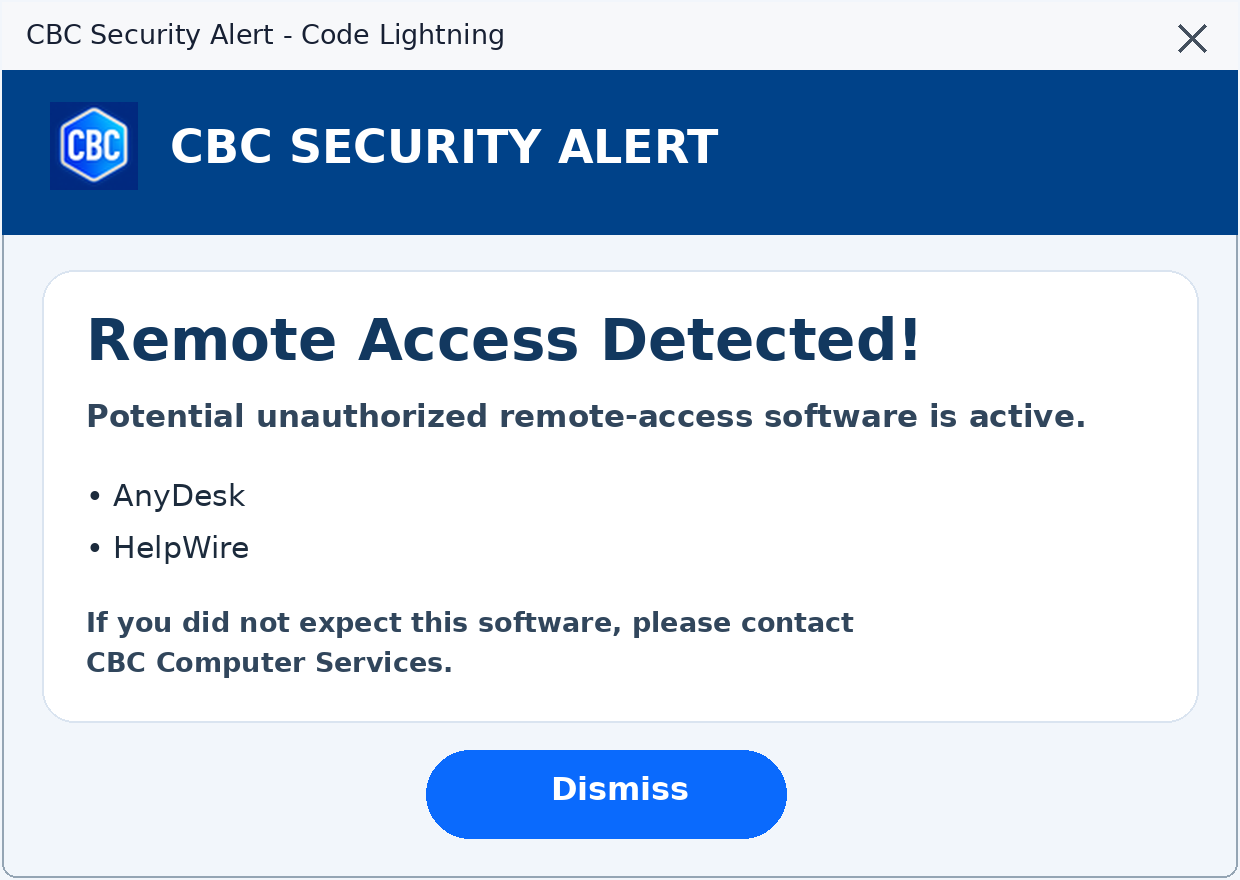
Know when remote-access software is present.
Remote support tools can be useful when you expect them. When you do not, they deserve your attention. Code Lightning quietly checks your computer and makes the information easy to understand.
Automatic monitoring
Code Lightning runs quietly in the background and checks for known third-party remote-access programs.
Clear security alerts
If monitored software is detected, the alert identifies it by name and tells you what to do next.
Lightweight and read-only
The monitor checks and reports. It does not remove programs, change settings, or interrupt your work.
Quiet when all is well. Clear when something is found.
Code Lightning checks
The monitor looks for recognizable signs of supported remote-access applications.
You receive an alert
If a program is found, a CBC Security Alert appears with the detected program name.
You decide what comes next
If the software is expected, simply dismiss the notice. If not, contact CBC Computer Services.
Seeing an alert does not automatically mean your computer is infected.
It means Code Lightning found remote-access software that deserves your attention. If you recognize and authorized it, there may be no cause for concern. If you did not expect it, do not approve any connection—contact CBC.
Remote-access awareness without the confusion.
Ask CBC Computer Services whether Code Lightning is a good fit for your Windows computer.
Contact CBC Computer Services