
Know When Remote Access Software Is Present.
Code Lightning quietly monitors your Windows computer for recognized third-party remote-access software and alerts you when something is detected.
See What's Connecting To Your Computer
Remote-access software can be useful when you intentionally use it. The problem is knowing when that software is present — especially when you weren't expecting it.
Automatic Monitoring
Code Lightning runs quietly in the background and periodically checks your computer for recognized third-party remote-access applications.
Detection Alerts
If recognized remote-access software is found installed or running, Code Lightning displays a clear alert so you can immediately review what was detected.
Emergency Controls
If something doesn't look right, Code Lightning gives you quick emergency controls designed to help stop recognized remote-access connections.
A Clear Alert. No Guessing.
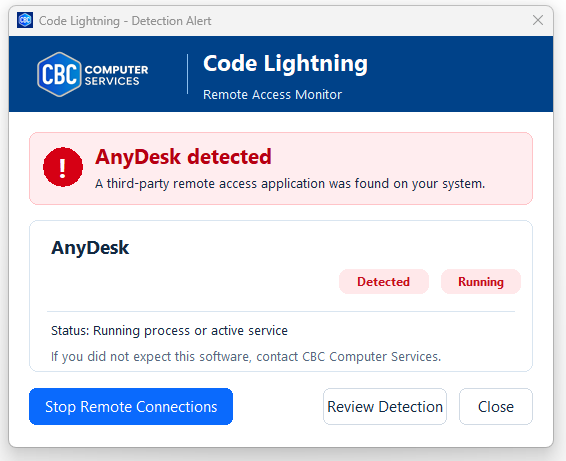
When Code Lightning recognizes third-party remote-access software, an alert appears on the screen identifying the application that was found.
The alert can show whether the software was detected on the computer and whether a related process or service appears to be actively running in the background.
If you don't recognize the remote-access software or weren't expecting anyone to connect to your computer, Code Lightning gives you immediate options to respond.
Detection Status
Code Lightning identifies the recognized remote-access application.
Lightning checks whether a recognized remote-access process or service appears to be active.
A visible alert gives you information about what was detected and provides response options.
Three Hotkeys. Fast Response.
If you ever become concerned about an unexpected remote connection, Code Lightning gives you keyboard shortcuts for immediate action.
Stop Remote Connections
Attempts to stop active recognized third-party remote-access applications and services while protecting CBC Assist and CBC components.
Disable Network Connection
Provides an emergency way to disable the computer's network connection when you need to quickly disconnect the machine.
Restore Network Connection
When you're ready, use the restore shortcut to re-enable the network connection that Code Lightning disabled.
CBC Support Stays Protected.
Code Lightning is designed to distinguish CBC's support tools from recognized third-party remote-access software.
CBC Assist and protected CBC components are not treated as unwanted third-party remote-access applications by Code Lightning's emergency stop feature.
Awareness Can Make A Big Difference.
Know What's There
Be made aware when recognized remote-access software is present on your computer.
Know When It's Active
Code Lightning can alert you when a recognized remote-access process or service appears to be running.
Respond Quickly
Emergency controls are available without searching through Windows settings or trying to identify processes yourself.
Call CBC When Unsure
If you receive an alert you don't recognize, CBC Computer Services is available to help you determine what to do next.
Something Doesn't Look Right?
We're Here To Help.
If Code Lightning detects remote-access software you weren't expecting, don't guess. Contact CBC Computer Services.